Fake Adult Sites Hijack Screens with Bogus Windows Updates to Deploy Infostealers
In the ever-evolving world of cyber threats, a cunning campaign called JackFix is exploiting users’ curiosity on fake adult websites to deliver devastating malware. As detailed in the Acronis Threat Research Unit (TRU) analysis at https://www.acronis.com/en/tru/posts/fake-adult-websites-pop-realistic-windows-update-screen-to-deliver-stealers-via-clickfix/, this attack combines malvertising, social engineering, and ClickFix tactics to mimic urgent Windows security updates. The result? A barrage of infostealers that can plunder passwords, crypto wallets, and more. This summary draws directly from the Acronis report to unpack the mechanics and arm you with defenses.
The Hook: Malvertising Leads to Phishing Adult Clones
The campaign kicks off with malvertising on shady sites peddling adult content or illegal goods, funneling victims to counterfeit platforms resembling xHamster or PornHub. According to the Acronis article, “It’s highly likely therefore that this attack begins as a malvertising campaign. An ad or pop up, likely on a shady website, one that deals in adult material or illegal wares, is likely an initial vector.” Once there, a simple click on an age verification prompt or anywhere on the page triggers the trap, capitalizing on users’ discomfort to rush hasty actions.
The Deception: A Convincing Fake Windows Update Screen
The core of JackFix is a full-screen overlay crafted with HTML and JavaScript, replicating Microsoft’s Windows Update interface down to the blue backdrop, animated waiting patterns, and a progress bar for “three critical security updates.” The Acronis report highlights how this setup creates intense psychological pressure: “The appearance of the familiar and likely trusted Windows Update screen, in combination with the urgency of requiring a download of three security updates right when you’ve entered a shady adult website, is a powerful combination of psychological pressures.” It even tries to block escapes like the F11 key, though not flawlessly across browsers, keeping victims locked in until they follow the ClickFix instructions to paste obfuscated commands into the Windows Run dialog.
Infection Chain: From Click to Malware Onslaught
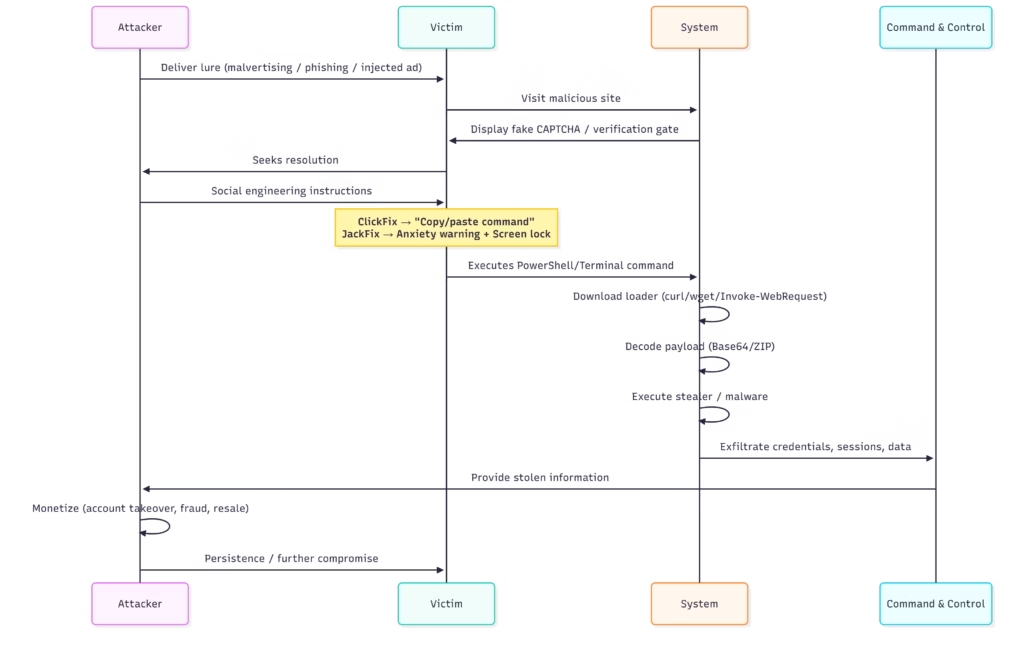
The Acronis analysis breaks down the multi-stage payload delivery with precision. Here’s how it unfolds, step by step, as outlined in the report:
- ClickFix Activation: Interaction copies hex-encoded commands to the clipboard, urging execution via Run dialog to “resolve” the fake update.
- mshta Launch: The command runs mshta.exe on a malicious .odd file, which unpacks obfuscated PowerShell code using charcode and Base64.
- Downloader Deployment: This triggers a massive second-stage PowerShell script (up to 13 MB, bloated with junk code) fetched from a command-and-control (C2) server. Notably, direct access to these URLs redirects to innocuous sites like Google, only activating via PowerShell to evade scanners like VirusTotal.
- Privilege Bombardment: The script loops UAC prompts for admin rights, potentially freezing the system: “The script then loops continuously until the victim allows for the script to run as admin.” It also adds broad Microsoft Defender exclusions.
- Payload Flood: With access granted, it deploys up to eight malware samples in a “spray and pray” tactic, including the latest RedLine stealer, Rhadamanthys, Vidar 2.0, Amadey, and various RATs or loaders. The report notes, “Deploys latest versions of Rhadamanthys, Vidar 2.0, RedLine, Amadey, as well as various loaders and RATs.”
Evasion shines through in hex obfuscation, random variable names, and even quirky remnants like a 2003 U.N. disarmament quote, all detailed in the Acronis post.
The Danger: Infostealers Like RedLine in the Spotlight
RedLine, a versatile infostealer targeting browser credentials and crypto assets, anchors this assault, but the multi-payload approach ensures fallout even if one fails. The Acronis report emphasizes the campaign’s rapid evolution since September 2024, with increasing obfuscation to outpace defenses.
Defense Strategies: Insights Straight from the Experts
Drawing from the Acronis recommendations, fortify your setup like this:
- Train against social engineering; never paste commands from pop-ups, especially on untrusted sites.
- Restrict PowerShell, cmd, and Run dialog for standard users.
- Monitor rare benign tools like mshta for external calls: “mshta is almost never used to reach out to an external address in a benign case and should be monitored.”
- Deploy tools blocking fileless attacks, such as Acronis XDR, which halts at the PowerShell stage.
Final Thoughts: Vigilance Against Evolving Threats
The JackFix campaign, as thoroughly dissected in the Acronis TRU article, exemplifies how attackers weaponize trust in familiar interfaces. By blending adult site lures with technical sleight-of-hand, it turns a moment of curiosity into catastrophe. Refer back to the full report at https://www.acronis.com/en/tru/posts/fake-adult-websites-pop-realistic-windows-update-screen-to-deliver-stealers-via-clickfix/ for IOCs and deeper dives and prioritize proactive security to sidestep these traps.